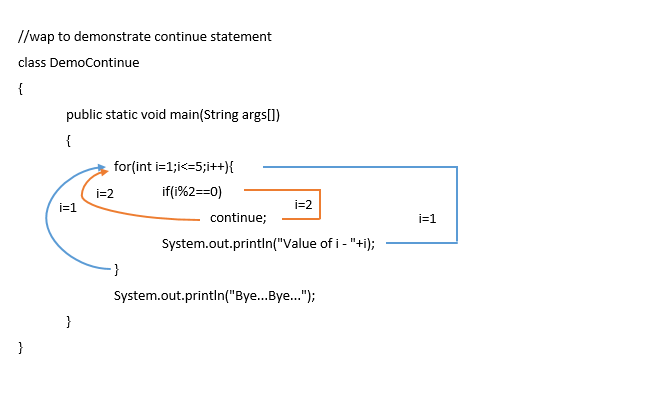
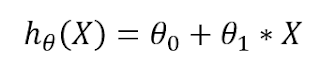
In the above example the values of i and j multiplied only for odd numbers when for even numbers it skips the iteration. Try these examples to get more clarity. Happy Coding... :)
Tuesday, 19 May 2020
In the above example the values of i and j multiplied only for odd numbers when for even numbers it skips the iteration. Try these examples to get more clarity. Happy Coding... :)

Tuesday, 5 May 2020
In this article, we are going to learn flow breaking statements. In Java, there are three different flow breaking statements such as, break, continue, and return.
Lets' understand the break statement is used to break the entire code block. We use break statement with switch statements to break the case statement. Even we can use the break statement to break the loop and we can use a break like goto (in C programming). Let's understand more about the different types of a break statement.
break with a switch statement that we have seen in one of the previous articles.
break
break label;
Saturday, 2 May 2020
Welcome to passionforcs,
In this article, we are going to discuss different flavors of for loop, in the previous article we have already seen that what is looping and how many looping statements are there? and basic syntax of looping statements but we can use for loop differently and we can play with the same syntax of for loop let's understand How?
As we know the main syntax of for loop is something like,
for(init;condition;increment/decrement)
{
//code block
}
If we want to make for loop infinite we can use the syntax below
for(;;)
{
//code block
}
If we have a counter variable and is already initialized we can use the syntax below
for(;condition;increment/decrement)
{
//code block
}
If we want to use for loop like while loop we can use the below syntax
for(;condition;)
{
//code block
//increment/decrement
}
when we use the above syntax the counter variable should have to be initialized and we have to add increment or decrement inside the loop
Tuesday, 7 April 2020
![]() |
| Make Firm Decision & Draw Your Path Image Src: pixabay |
|
Statement |
Usage |
Syntax |
How to use? Example |
|
simple if |
To make a simple decision on the basis of single condition. if the condition is true, it returns a result otherwise it doesnot return anything. |
if(condition){ |
int age=18; |
|
if-else |
Used to make two way decision i.e. if the condition is true, it returns an appropriate answer and if condition is false, it returns the statements of else block. |
if(condition){ |
int age=15; |
|
else-if ladder (Multiple if else) |
When we have multiple conditions we can work with else-if ladder. When we work on else-if ladder, else part is optional. |
if(condition-1){ |
int percent=70; |
|
Nested if-else |
It is known as nested as its’ syntax is like that. It means if inside if let’s understand through its syntax. |
if(condition){ if(condition){ //code block } else{ //code block } } else{ if(condition){ //code block } else{ //code block } } |
int a=5,b=2; if(a!=b){ if(a>b){ System.out.println(a+” is max”); } else{ System.out.println(b+” is max”); } } else{ System.out.println(“Both are same”); } |
|
switch - case |
Generally, it is not a pure decision making statement, it uses an expression for int and char data types only and based on expression it chooses its label and executes code block. But if no label matches, it goes to default and perform default code block. Here, we use break statement it is not compulsory every time it depends on situation that we need to add break or continue type of jumping statement or not. Even if we have same values for multiple case we can write different cases together and at last we can add it’s code block |
switch(expression){ case label-1: //code block-1 break; case label-2: //code block-2 break; case label-n: //code block-n break; default: //default code block } |
int a=3; switch(a){ case 1: System.out.println(“ONE”); break; case 2: System.out.println(“TWO”); break; case 3: System.out.println(“THREE”); break; default: System.out.println(“Invalid Input”); break; //break is optional in default. } |
Wednesday, 18 March 2020
Today we are going to learn more operators. In one of my previous articles, I have mentioned that Java is rich and powerful in the matter of Operators.
Some Operators such as,
.(Dot)
|
This operator is used as a member access operator.
|
| + | This operator is also used as a string concatenation operator. |
[ ]
|
Square brackets are used to define the size of the operator.
|
| instanceof | This operator is used to check the object is defined in the class or not. |
+=
|
Arithmetic addition and assign to the variable, for example, a+=b
|
| -= | Arithmetic subtraction and assign to the variable, for example, a-=b |
*=
|
Arithmetic multiplication and assign to the variable, for example,
a*=b
|
| /= | Arithmetic division and assign to the variable, for example, a/=b |
%=
|
Arithmetic modules and assign to the variable, for example, a%=b
|
| &= | Bitwise AND and assignment |
|=
|
Bitwise OR and assignment
|
| ^= | Bitwise exclusive OR assignment |
>>=
|
Shift right with assignment
|
| >>>= | Shift right zero fill assignment |
<<=
|
Shift left with the assignment
|
These are more operators available in Java. That's it with the operators in Java. Let's take an example of instanceof operator.
Try this example and check the output.